Hello,
I tried to use the Space Connector Node and use a Flow Variable for spaceName value.
This setting seems to be ignored in my set up, the chosen Space stays the one configured in Settings Tab.
I am using KAP Version 5.5.1.
Thanks for any hints
Hello @Dnreb,
seems like a bug. Tried it on KNIME version 5.5.2 and 5.10.0 and setting is ignored.
Br,
Ivan
Hello @ipazin,
thanks for testing on your side.
For now I use a workaround without the variable, but need to “multiply” the step.
I can confirm that this setting is not used in the node and it should thus not be possible to set a flow variable for the space name at all. Only the id is used to identify the space in this node.
We will remove the possibility to set the flow variable within the modern dialog of the node to avoid further confusion. Thanks for reporting the problem.
Best Regards
Paul
Hello @Paul_Brnrthr,
tnx for clarification. Makes sense now. But I advise if possible to still leave option to create a flow variable holding Space name in case someone needs it.
@Dnreb with spaceID you can parametrize Space Connector and space you are connecting to. SpaceID is easiest obtaining from Space Connector node itself by creating flow variable from it. I couldn’t find this information on KNIME Community Hub for my Private spaces and for Public you can see it in URL link when sharing it. Just need to add asterisk (*) in front.
Br,
Ivan
Hello @ipazin,
thanks a lot for the explenation with spaceID. This works and now I can use it in a loop which makes it much more convenient!
Hi Dnreb, would you mind sharing a screenshot of your loop setup? I’m still learning and tried to build a similar workflow, so it would really help me understand how the loop is structured. Thanks!
@ooiweisem ,
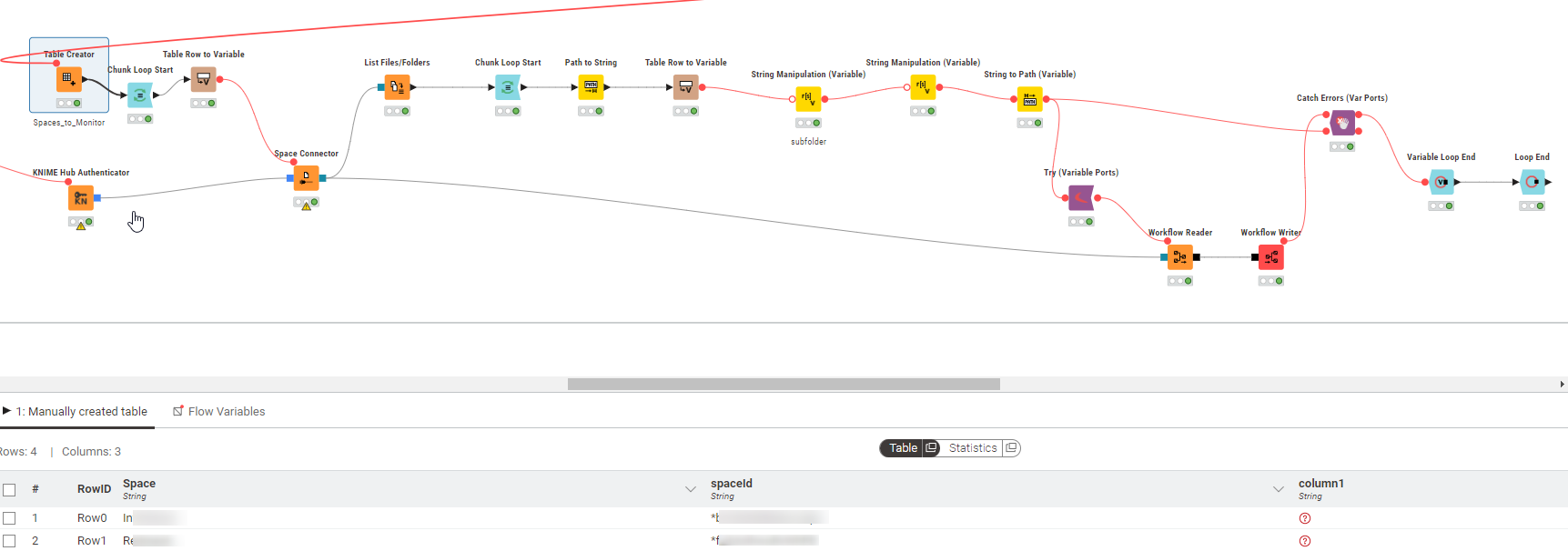
sure, roughly I use it as below.
The spaces to loop are provided in a table.
Using the spaceId as variable input, I loop as below to check which workflows I find in each space, handle each folder found and in case it is a workflow I save it at an alternative location.