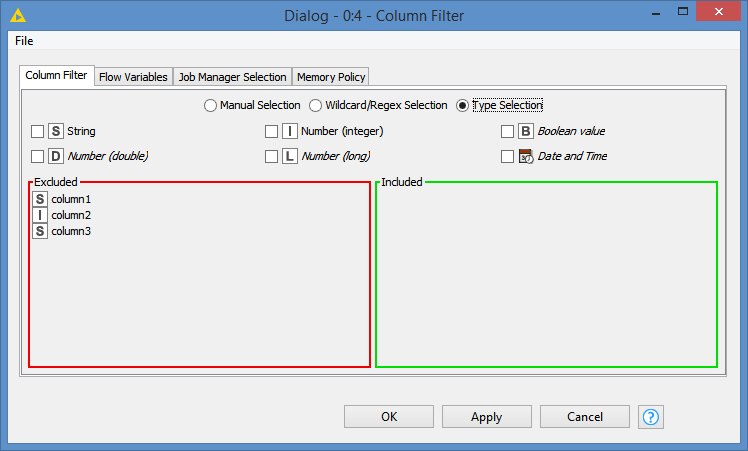
Currently it is not possible to select columns for the String Manipulation (Multi Column) by data type, only by manual selection, wildcard or regex pattern:
It would make the node considerably more useful if it was possible to select by column type, particularly as any selected set of columns is likely to be the argument of a function within the expression and as such likely to be all of the same type.
It would also mean that the node could be re-used by copy-paste or in a component/metanode on different input tables, or when an incoming table spec changes slightly without reconfiguring.
I was just going to add this suggestion myself, as it came up in a forum post today, and I agree with @Vernalis that this would make a lot of sense for the reasons stated. Without this, you either have to always manually select the required columns, or you end up inadvertently writing a script that turns every column into a string.
It always seemed odd that this node lacked the ability to select by Data Type. I typically use the Column Splitter before it so that only the allowed types feed into String Manipulation (Multi-Column), then narrow down selection (if needed) afterwards. I think it would be useful to have this 2 step approach in the node itself. Filter by a type first, followed by an optional Select Filter for individual columns. It would reduce the errors thrown for incorrect column type being selected, and help highlight incorrect data type classifications in the input.
Hi @iCFO , yes I’ve done similar but out of interest, what strategy do you employ for reassembling the columns in the order they appeared before splitting?
Using Column Appender, for example, will dump all the strings at the beginning or end, and reference column resorter can deal with it but has to have some data prep (e.g. grab the column list from the original table). It’s not that arduous but a small niggle for what should be such a trivial operation. Wondering if I’m missing an “obvious” solution. I’m looking for a Column Un-splitter
btw Column Splitter has caught me out on more than one occasion by sending the “included” columns to the bottom port instead of the top where I expect them to be! lol
I essentially take the same approach that you described above. However, I tend to use my own internal column names / data types in most of my more complex workflows. This allows me to just drop in a pre-configured internal component called “column cleanup” that handles resorting, ensuring the presence of all necessary columns, and a few other minor cleanup tasks.
That got me thinking. Actually I could do similar using a component I have that collects column names from the current data table into a String array. I could put this before the Row Splitter, and then feed the string array variable to a Column Resorter at the other end. It would work for my simple use case.