Hi, Are there any plans to start supporting Python 3.12.
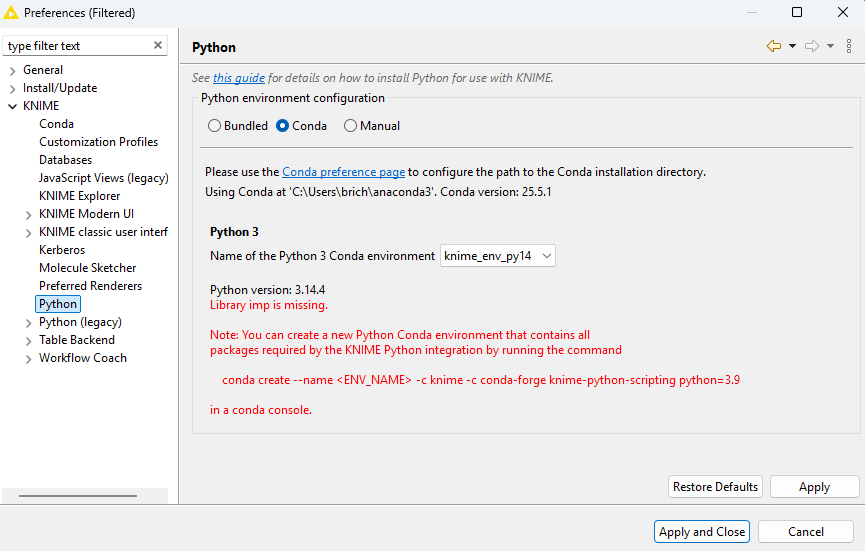
There is the current issue of Python 3.12 not supporting imp module anymore, whilst KNIME requires it. There is a new library called importlib, but this is not recognised by KNIME.
I am having some Python modules requiring 3.12 now, so it is becoming more problematic.
yes, we are adding support for Python 3.12 to 3.14 to the next KNIME AP Release 5.9 for both, Python scripts and Python-based extensions.
Tech Detail: The issue was not just imp, but that from Python 3.12 one has to use newer Pandas and Numpy versions, which required some more fixes to how you can access KNIME tables from within Python scripts.
If you need this as part of an LTS release, it’ll make it into the LTS release in Summer 2026
thank you for implementing support of newer Python versions. I understood your answer as “5.9 is compatible with newer versions”. This seems not to be the case as of today.
Can you please give an updated timeframe for the non-LTS release?
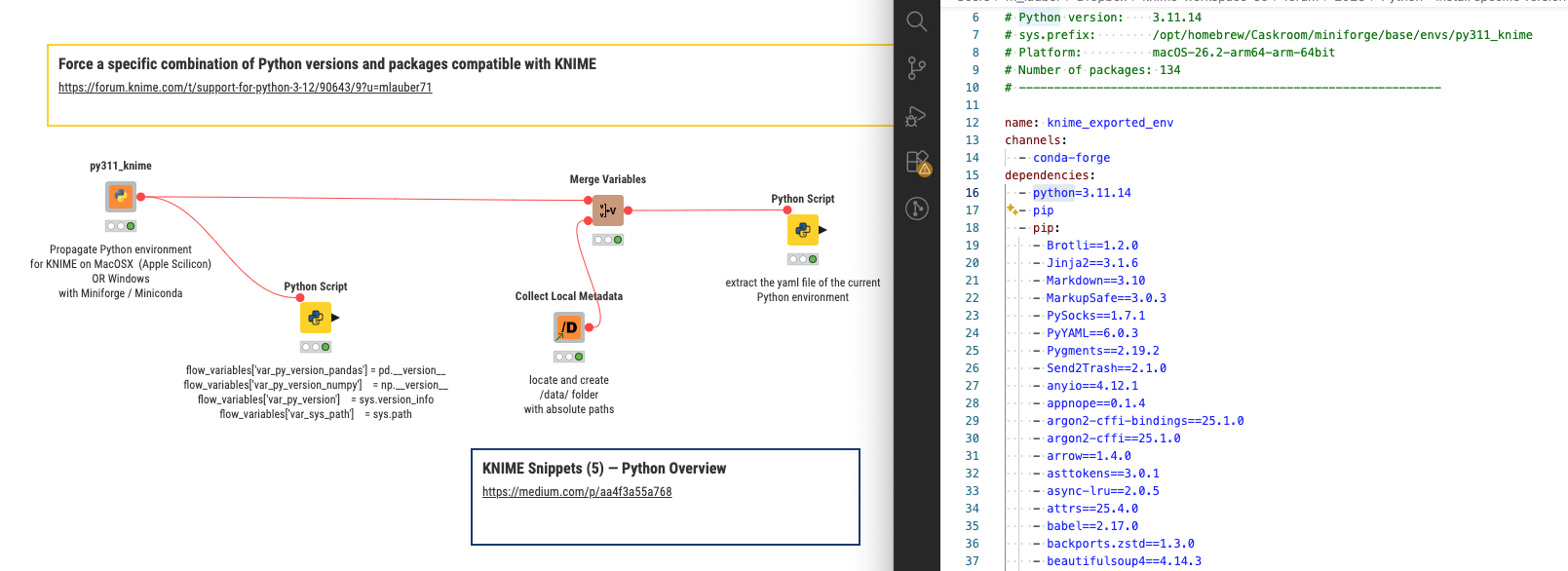
@waterman you can try and extract the .yml files that are being used for several KNIME Python environments. Not sure if there are other locations where to look. Currently the configurations goes up to Python 3.9 - also not sure if the configurations for the deep learning environments are up to date.
we did add support for Python versions up to 3.14 to KNIME 5.9. You can use the Python Script node (not the legacy node, though, neither the Deep Learning nodes) with these Python versions.
To make it easy to create conda environments with the respective knime version, install the knime-python-base or knime-python-scripting package from the Conda channel knime, as described in the docs here (you can also find here which packages are available).
Sidenote: the docs are not up to date, they still say versions 3.9 - 3.11 are available. I’ll update it to 3.10 to 3.14.
@waterman can you check your versions again. At least on my MacOS the generic Python version of KNIME 5.9 is “3.11.13“ currently. Maybe you can run the nodes and see what it says on your end.
It will also try to create a “knime_env_export.yml“ file under /data/ folder that should contain the packages being used in the current Python environment.
@mlauber71 : The python version 3.14 I was refering to is the version that is installed “manually” on my PC by our IT department.
“We” do not allow older/different versions of python (except the bundled version in Knime) and “we” don’t allow conda.
I need ODBC to connect to an old database, so I set up a manual Python environment with uv and uses pyodbc. Everything went smoothly untill we switched from Python 3.11.9 to Python 3.14.
If I understood correctly the whole problem is the imp library that was deprecated with python 3.12. So I was kinda hoping for Knime 5.9 to just work with newer Python versions without imp.
To make a long (and boring) story short: After executing your workflow, I can confirm, that the generic python version is in fact 3.11.13.
@waterman are you allowed to use tools like miniforge, maybe limited to conda-forge so not as to come into conflict with Anaconda’s policy?
Then you could try and form a setup of packages that would use Python 3.11 and the necessary other packages from knime-python-base and then add your library. Which is this BTW?
You might use conda on a separate machine to let it figure out the exact combination and then install the packages and versions with pip maybe if you definitely cannot use any form of conda.
@waterman you could define a simple yaml file with ‘boundaries’ for KNIME compatibility like python<3.12 and knime-python-base<=5.9 and then add you package as coda-forge package or pip. In this example in the place of vtreat. Or just at the end right before pip.
Conda will then create a complete list of packages that you could then install separately.
name: py311_knime         # Name of the created environment
channels:                # Repositories to search for packages
- conda-forge
- knime                  # conda search knime-python-base -c knime --info
dependencies:            # List of packages that should be installed
- python<3.12            # Python
- knime-python-base<=5.9 # dependencies of KNIME - Python integration
- cairo                  # SVG support
- pillow                 # Image inputs/outputs
- libutf8proc            # C library for processing UTF-8 Unicode data
- matplotlib             # Plotting
- IPython                # Notebook support
- nbformat               # Notebook support
- scipy                  # Notebook support
- jpype1                 # A Python to Java bridge
- jupyter                # Jupyter Notebook
- pip                    # Python installer
- pip:                   # install additional packages via pip
# - vtreat