Hi all,
Thanks for having me - this is my first post and I’m hoping what I’m trying to do is possible.
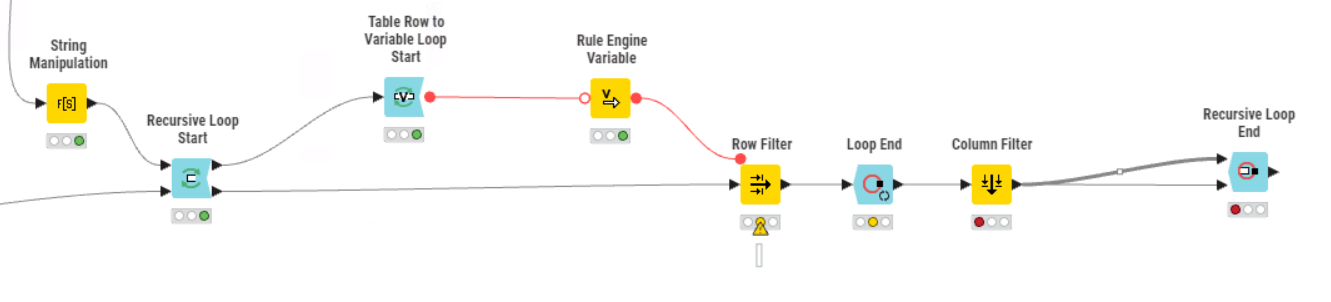
I have a table containing a variety of filters for a table of chemical data - MW, HBA, HBD, etc. that I have generated from an earlier file input. I’d like to use each row of this table to do iterative filters on a data set by converting the row to three flow variables. I would then pass the filtered data back to the start of the loop to then be filtered again by the second row of the table. I’m fully aware the wiring is wrong in the workflow attached but I hope this gives an idea of what I’m trying to do.
Thanks in advance!
you are looping the filtered data back. hence, I assume that in the end, you want all filters applied “together”.
One option to simplify:
You can convert your filter criteria into Rules that are valid for Rule-based Row Filter. Then you just GroupBy concat the rules with " AND " as separator and have 1 rather large rule that will give you the same result.
there are lots of different approaches, with loops, with recursive loops, with masks, one step or multiple steps.
solution depends more on the size of the data (recursive might be bad for very large datasets) and if you need a “path” showing which criteria made a record invalid/break the rule
2 Likes
Yes, you’re right. I need all the filters applied ‘together’.
Data sets are likely to be in the region of 1-10 million rows depending on the project.
I don’t require a path per se for each rule, but the number of rules will change depending on the project, which is why I initially opted for the loop rather than concatenating the rules together. However, the groupby concat is a nice option that I will definitely try.
Thanks!
for this amount of records, filtering with a single rule will be a lot quicker than an iterative or recursive approach
I appreciate that and thanks for your reply. I have gone with the recursive loop option and managed to fix the wiring in order to iterate through the table then stop at the end. After the first loop the process runs very quickly as a huge number of records are removed in the initial pass.
Your point around a path showing which rows were removed at which point is an interesting one. It’s not strictly necessary but would be an interesting exercise that could be utilised in the future. I’m struggling to rationalise how to do this - I’m thinking of tagging the data somewhere in the loop with the iteration they were removed. However, this means I’d have to run 3 million rows through the loop 5+ times, which is not very efficient. Any other thoughts?
your knime version seems rather old.
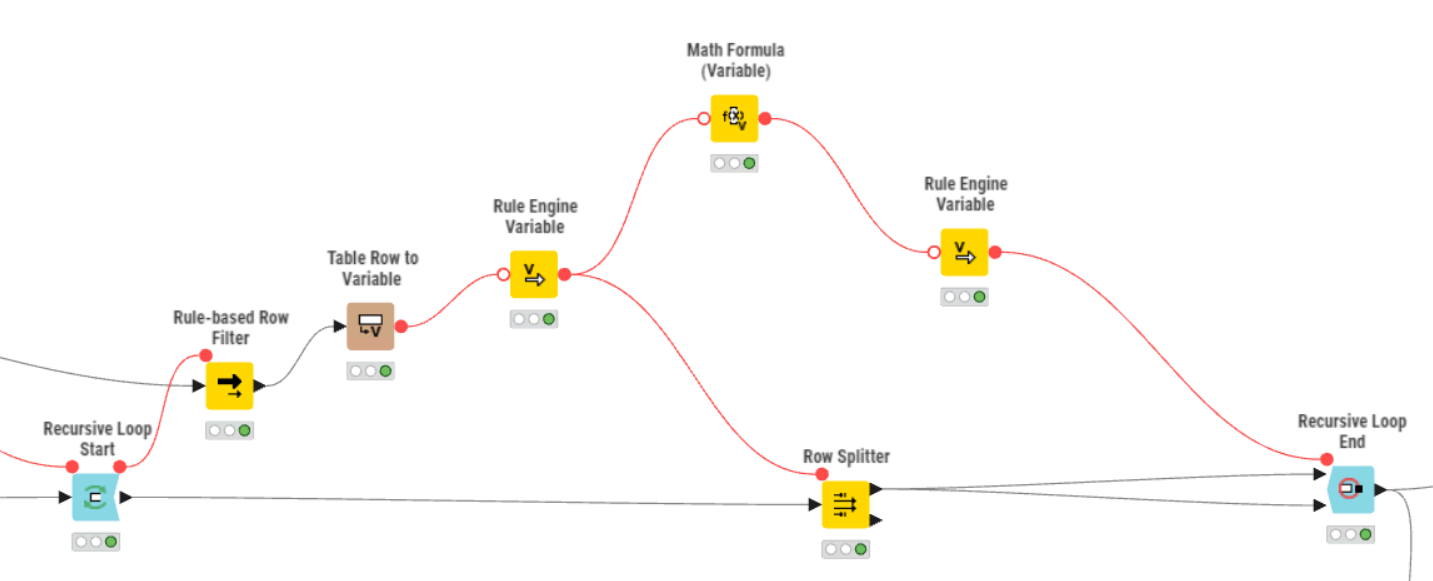
in newer versions, the recursive loop start and end allow to handle not only 1 loopback but multiple.
if you use a Row Splitter and pipe the “sorted” out data to 2nd path and concat those with all those that get sorted out each round, you can collect them.
if you add the iteration column from the loop end, you will get that information, too.
otherwise, you can use variable to column, to append your Rule (or cross joiner) to the sorted out rows
1 Like
I have subsequently worked out how to have multiple table inputs and outputs in the same recursive loop - that’s something that has flummoxed me for a while. I’m using a very up to date version so there’s no issue with that.
Thanks so much for your help.