ow to transform multiple columns with a string value (very high to very low) into new columns with integers
Hi @DinahA.Koehler4,
did you tried the String to Number node?
Best, Mike
CTO @ DataNautics GmbH - Your KNIME-Experts
Contact: info@datanautics.gmbh // datanautics.gmbh // +49(0)170-325 713 9 // Linkedin
Daten Automatisierung für Finanz-, Produktion-, IT- und Marketing-Prozesse mit KNIME
I need to change several string columns with 5 levels (very high, high, medium, low, very low) to integer levels 5 - 1. It would be the same operation on about 15 columns in one data file.
Noting easier than that.
- Option 1: Manually classify using Rule Engine
- Option 2: Dynamically assign by levaring automatic order of values
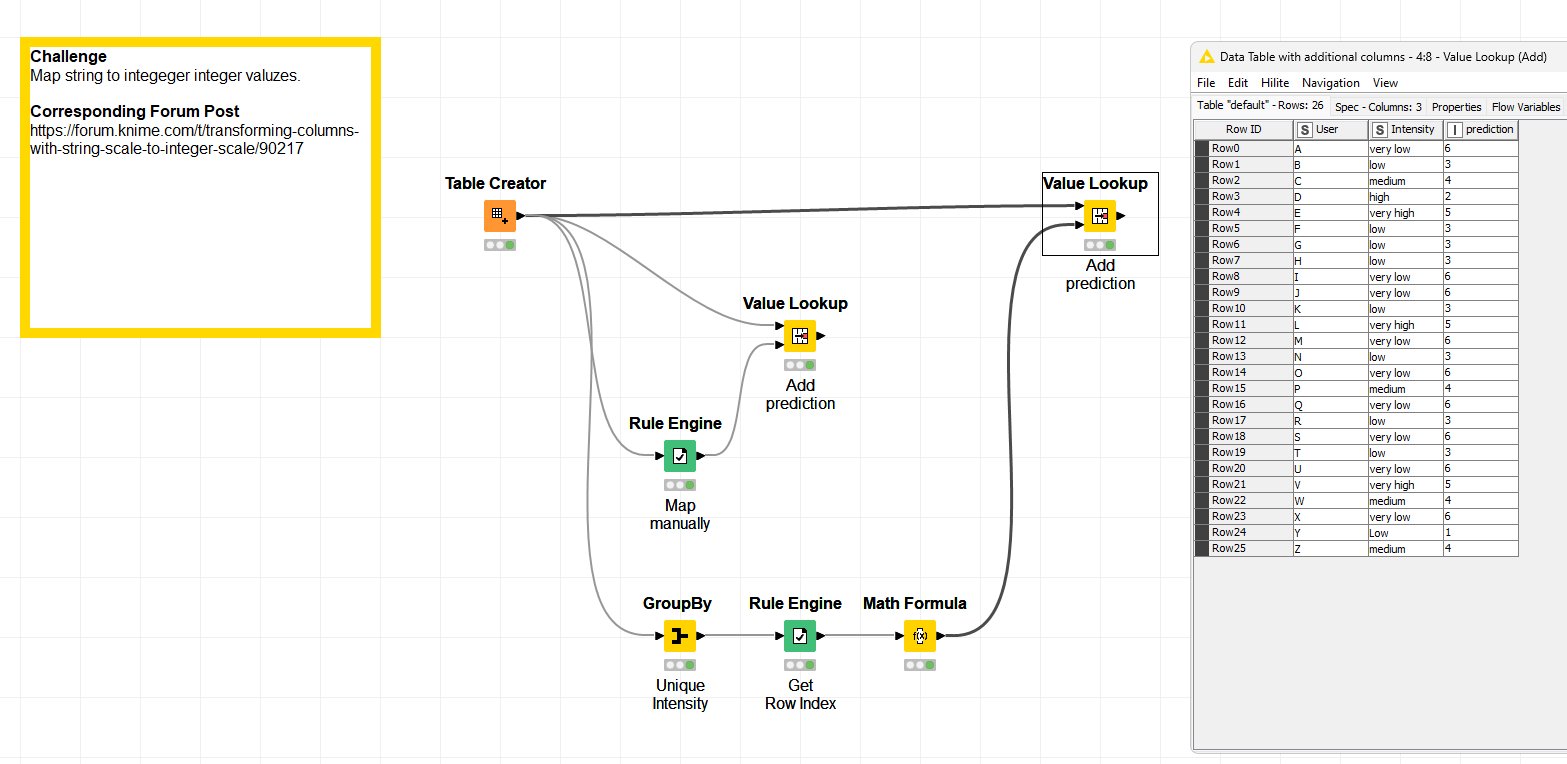
Here is the solution:
If that works for you, please mark this post as the solution.
Best, Mike
CTO @ DataNautics GmbH - Your KNIME-Experts
Contact: info@datanautics.gmbh // datanautics.gmbh // +49(0)170-325 713 9 // Linkedin
Daten Automatisierung für Finanz-, Produktion-, IT- und Marketing-Prozesse mit KNIME
2 Likes
It would be easier to help if you could supply some sample data.
1 Like
I have successfully used this code in the Rule Engine Node to transform my string data into a number for a single column and am trying to do this in the String Manipulation (multi column) node, without success:
$$CURRENTCOLUMN$$ = “Very high” => 5
$$CURRENTCOLUMN$$ = “High” => 4
$$CURRENTCOLUMN$$ = “Medium” => 3
$$CURRENTCOLUMN$$ = “Low” => 2
$$CURRENTCOLUMN$$ = “Very Low” => 1
As the name implies, the String Manipulation node is not intended to apply rules. Its use is to manipulate strings. As I asked earlier, could you please supply some sample data.
Please check the solutions provided by @mwiegand . They offer everything that is needed to solve the problem
1 Like
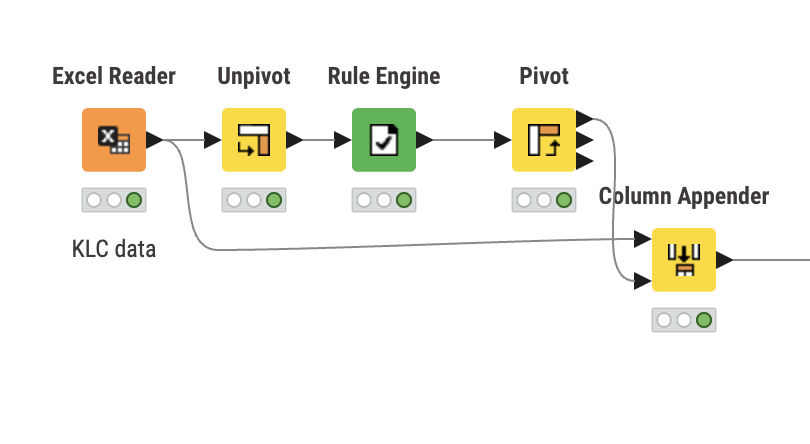
Hi @DinahA.Koehler4 , one method of applying the Rule Engine to multiple columns is to place it between Unpivot and Pivot nodes,
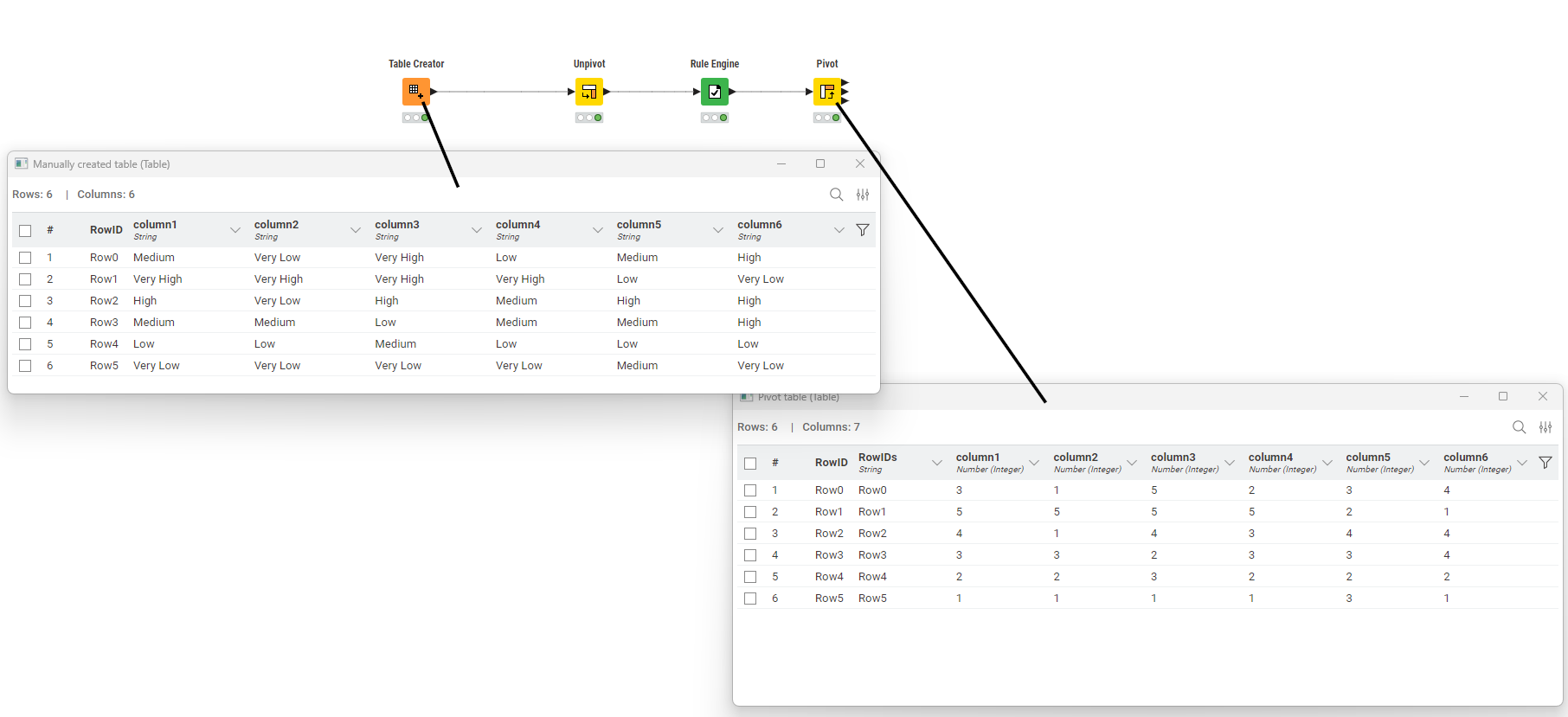
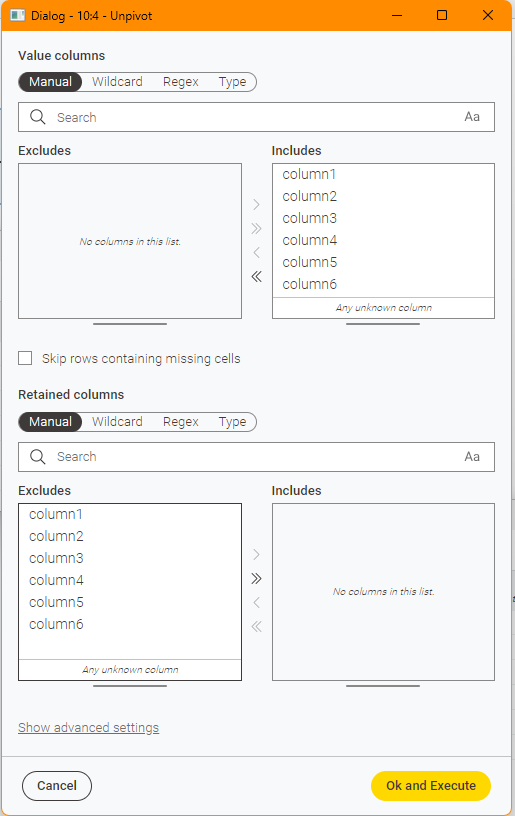
The Unpivot node is set to include all the columns that are to be acted on by the Rule Engine as “Value” columns. If there are other columns that aren’t involved in the Rule Engine, you would include these in “Retained” columns
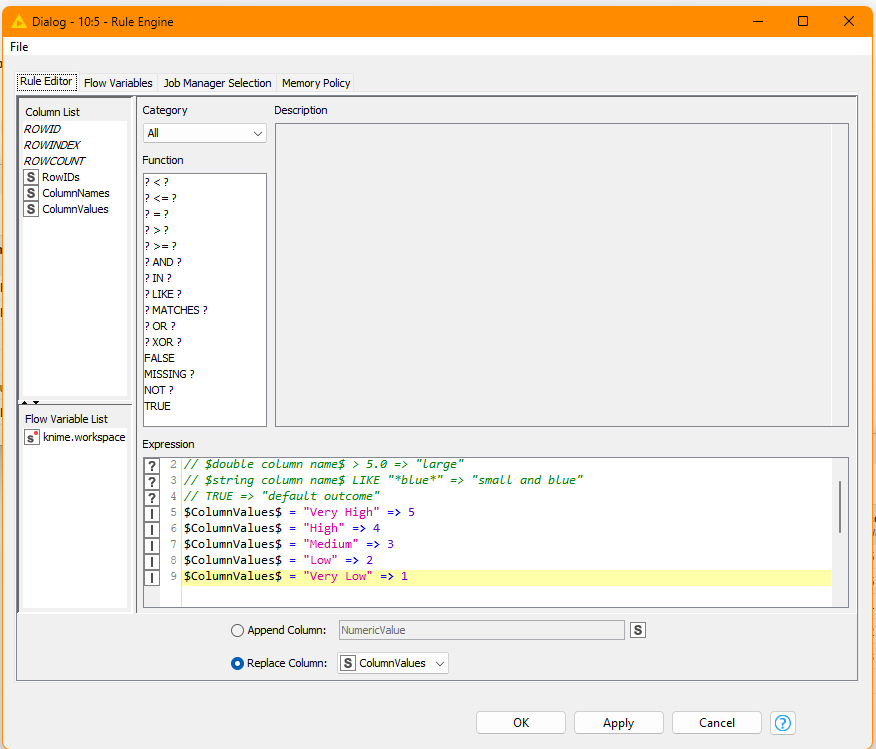
The Rule Engine then acts on the ColumnValues column that is output from the Unpivot
Finally the Pivot node returns the modified version of the table.
Set the Groups as any columns that were “retained”, but RowIDs can work by itself if there were no other columns
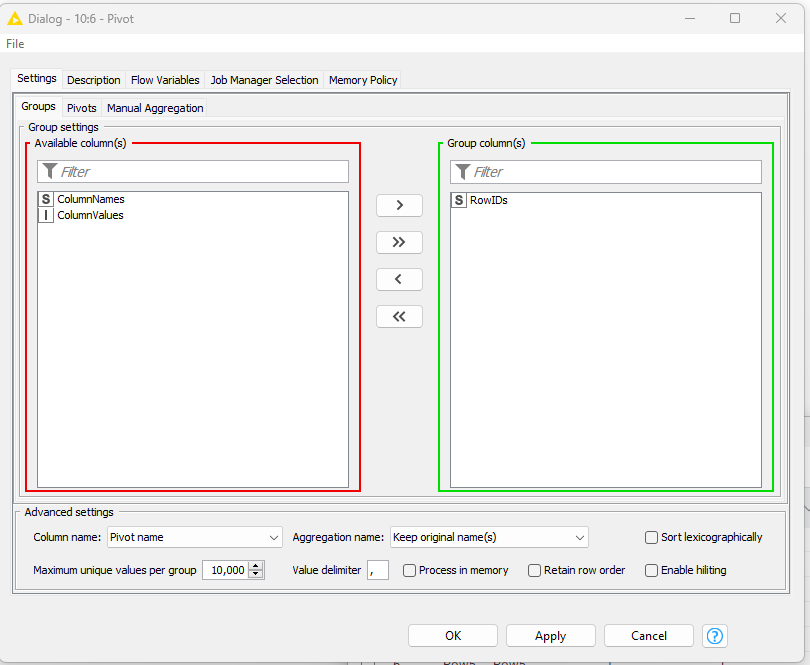
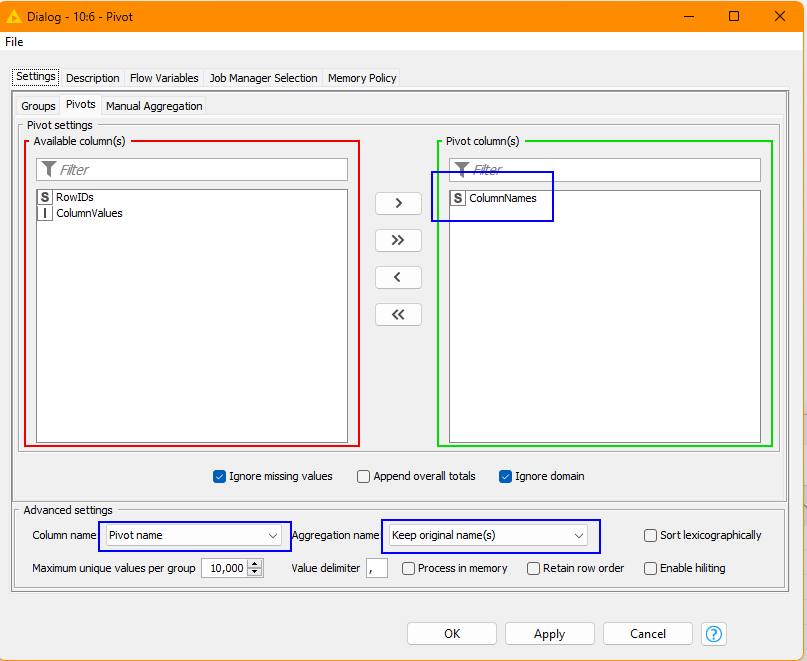
For Pivots, set this to “ColumnNames”
and specify the other settings marked in blue squares here:
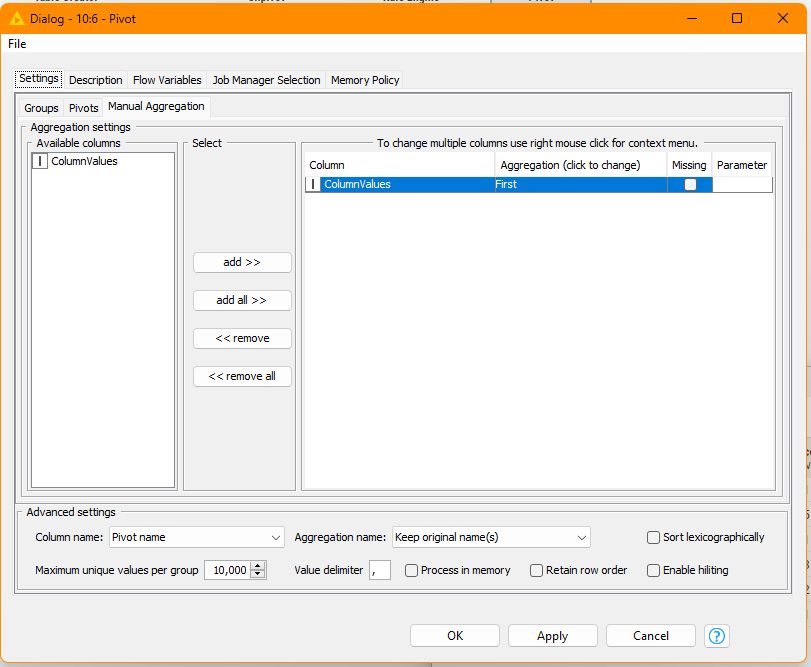
and finally, for Manual Aggregation set it as follows, collecting “First” for ColumnValues
If you need to append the resultant table back on to the original, then Column Appender or Joiner should be able to achieve this.
—
As @rfiegel mentioned, the String Manipulation node is not designed for evaluating rules. However… there is an alternative “hack” method using String Manipulation (Multi Column) that would work in this situation:
toInt(
 $$CURRENTCOLUMN$$.equals(“Very High”)?5
:$$CURRENTCOLUMN$$.equals(“High”)?4
:$$CURRENTCOLUMN$$.equals(“Medium”)?3
:$$CURRENTCOLUMN$$.equals(“Low”)?2
:$$CURRENTCOLUMN$$.equals(“Very Low”)?1
:0)
I don’t think you will find that in any official documentation.
You will find my post on String Manipulation “hacks” here:
and more specifically, related to conditions, here:
3 Likes
| Heat Stress baseline | Heat stress 2030 RCP2.6 | Heat stress 2030 RCP 4.5 |
|---|---|---|
| High | High | High |
| Medium | Medium | Medium |
| Medium | Medium | Medium |
| Medium | Medium | Medium |
| Very High | Very High | Very High |
| Medium | Medium | Medium |
| Medium | Medium | Medium |
| Medium | Medium | Medium |
| Medium | Medium | Medium |
| Medium | Medium | Medium |
| High | High | High |
| Medium | Medium | Medium |
| Medium | Medium | Medium |
| Medium | Medium | Medium |
| Medium | Medium | Medium |
| High | High | High |
| Medium | Medium | Medium |
| High | High | High |
As I am new to Knime (but familiar with programming in SAS) I am having a hard time understanding what “manually classify using Rule Engine” means. It would help to see a screen shot of the Dialog view of the rule engine and the Value lookup so I can replicate it.
I’ve attached a workflow using your data
Apply Multi Column Rules - takbb.knwf (3.4 MB)
As well as the suggestions I mentioned earlier for dealing with rules applied to multiple columns, I have also included an example of using my “Rule Engine (Multi Column)” component which provides the functionality I would like to have seen made available as a standard node!
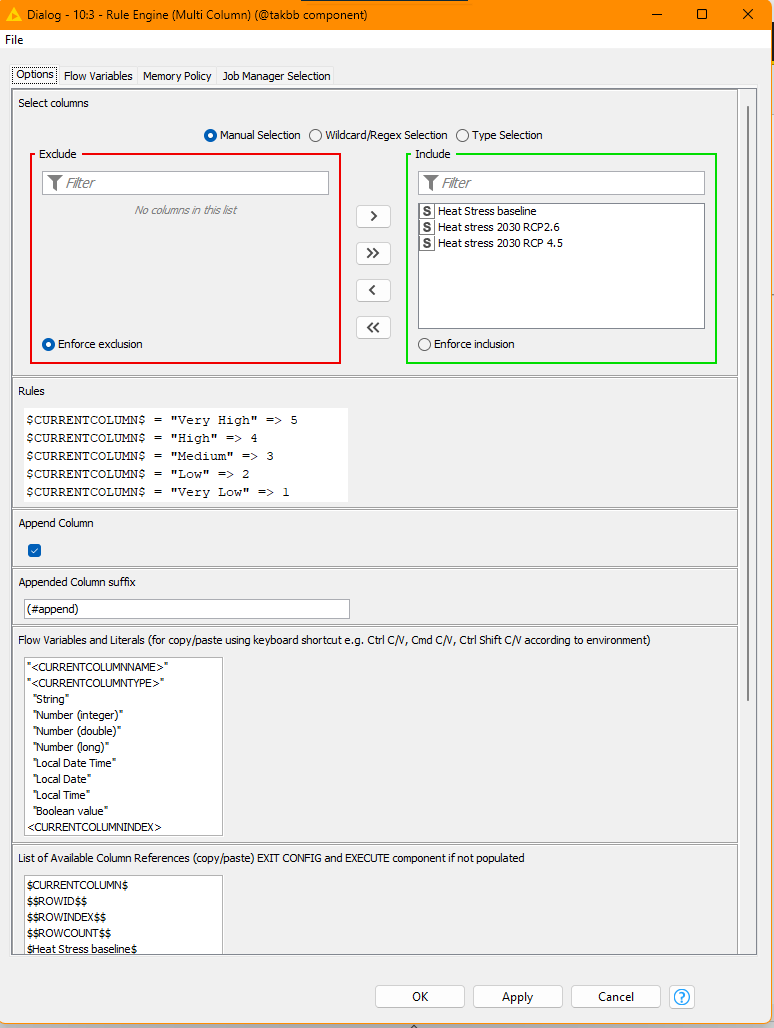
It pretty much provides the functionality you mentioned earlier:
$CURRENTCOLUMN$ = “Very High” => 5
$CURRENTCOLUMN$ = “High” => 4
$CURRENTCOLUMN$ = “Medium” => 3
$CURRENTCOLUMN$ = “Low” => 2
$CURRENTCOLUMN$ = “Very Low” => 1
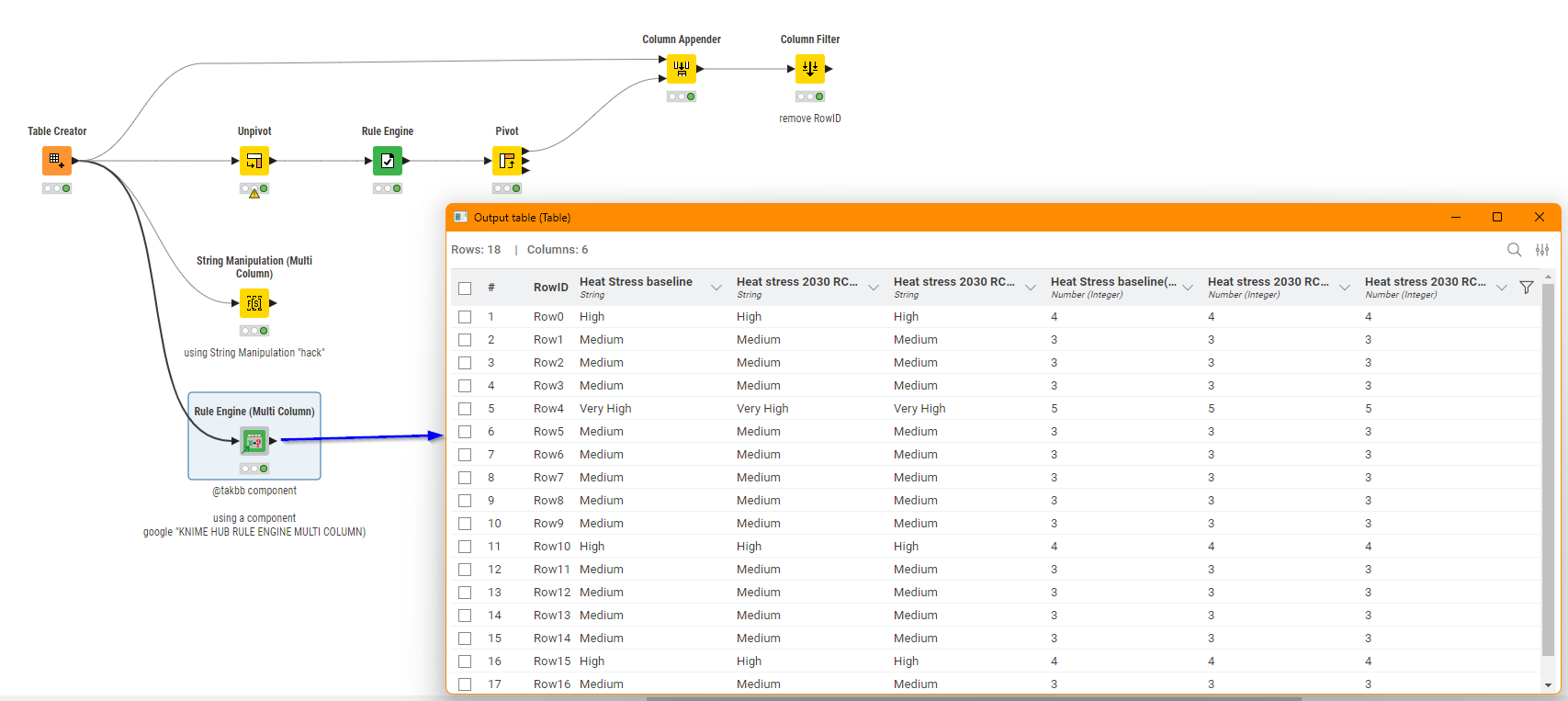
The component is available from here:
It’s worth noting though that by its nature the component will be considerably slower on larger datasets than the other methods given, as it is quite complicated: behind the scenes it is doing a lot of work to actually turn the supplied script into something usable by the standard Rule Engine, within a recursive loop, and also attempt to automatically handle changing datatypes that may be returned.
This topic was automatically closed 7 days after the last reply. New replies are no longer allowed.