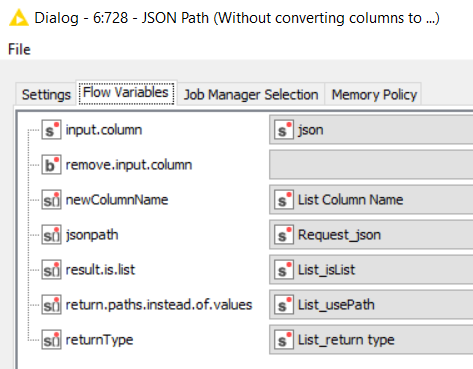
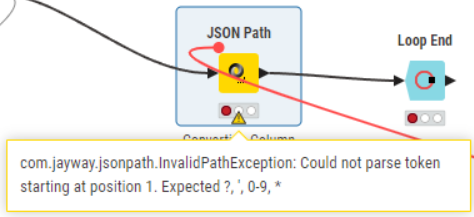
I’m having a hard time using flow variables in the JSON Path node. I define the flow variables just before using a Column Expression node, but when I try to configure the JSON Path node with these variables, I get the following error:
To illustrate, I’m sharing a small example workflow. It doesn’t have any real-world meaning, but the idea is to automate the extraction of information from a JSON using JSON Path, and to determine the path dynamically using a loop and the current iteration number.
I’m not sure if the variables need to be converted to arrays or handled differently, and I haven’t been able to figure it out yet.
I’m trying to follow the approach of controlling almost all fields with flow variables, as suggested in that challenge, but I’m still stuck at this step.
If anyone could guide me on how to properly format or convert flow variables for use in the JSON Path node, it would be really helpful!
I guess you already identified the issue with the upper part of the workflow as you tried to address it in the lower part, but just as an explanation for other readers who try to figure out the issue: the JSON Path node expects a list of strings, but you provide a string. Have a look at the symbols which are s and s:
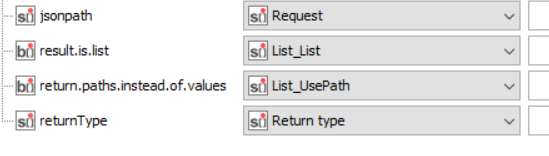
In the lower part of the workflow you already create collections, now the issue is that it doesn’t interpret the boolean values correctly. Interestingly, it seems like the needed flow variable type changes: result.is.list and return.paths.instead.of.values now expect a list of booleans b
I think the difference comes from adding a query to the settings tabs, once you click on “add single query” (or then remove the JSONPath) the type of needed variable changes. (is this a bug?)
However, even if the string array is fine (by removing the JSONPath query from the lower JSON Path node), there is a new error: Invalid return type json, json. When I remove the return type variable (just for the moment, to identify other issues), I get the error “No JSON Path was specified”. So it seems it is necessary to add at least a dummy JSON Path query in the settings, but that again changes the needed variables to boolean. By removing the needeed boolean variables from the flow variables tab, I get a new error:
Due to a lack of time at the moment, I’m giving up here. Maybe someone else has another idea?
You could try to go one setting at a time: first manually configure the JSON Path node, and then replace the individual settings step by step. Also, make sure you have boolean lists where needed. Maybe there is also a way to create a collection directly with the Column Expression node (at least you can tick collection there), but I haven’t figured out yet how you would need to format the expression so that it correctly returns a string array.