We developed automation via KNIME Pro because we believe this is a more maintainable, scalable path to fully automate your workflows. Therefore, starting with KNIME Analytics Platform 5.9, Batch Execution will need to be installed via a separate extension and will no longer be available with the default build.
So going forward, there are two ways to automate your workflows:
Option 1: KNIME Pro – The recommended way to automate workflows, with a fully managed environment and developer support.
Option 2: KNIME Batch Executor – For those who prefer command-line automation. It continues to work as before, but is now installed separately as an extension.
Learn more, including how to install the Batch Executor and how to get started with KNIME Pro, here: Workflow Automation in KNIME.
If anything’s unclear, feel free to reply to this post. We are here to understand your needs and better support you.
It’s puzzling to observe that local batch execution would need to become an extension, given its long tradition of being built-in. Is the plan to cut this feature at some point in the future?
there are even more issues arising that already cut into executing knime batches within a knime instance (regular or batched).
knime corp obviously need to make money. I wouldn’t expect any new features or improvements to KAP w.r.t. to local automation. At best, you have others (third parties or open source contributions) develop an wrapper or application around it (similar to the Nodepit Runner for Knime)
I second that, nodepit batch is the way to go , per the changelog it’s already compatible with version 5.9. Hoping the nodepit team can make this free from or is able to work around the dependencies ( e.g. if knime decides to disable the option altogether).
I understand KNIME needs to make money and I want them to as it’s really hard & resource intensives to maintain the software of such caliber. I also suggest KNIME should start accepting community donations via Patreon or otherwise - a lot of community members would happily donate (myself included) to ensure continuity of the “core’“ platform. There are a few recent signals I found potentially worrying from the community/open source perspective (including this thread) e.g. mentions of KNIME being browser-based in the future (but no mention of a self-hostable option). Community /ecosystem is what makes KNIME attractive in the first place so in the event of e g. getting acquired in the future I’m at least hoping there’ll be forks available (e.g. like with kettle/pentahoo aka Apache hop).
we find KNIME Pro as an alternative quite compelling (if you can go cloud) and figured that many users who reached out to us because of problems with batch (maintaince, technical knowledge required etc) weren’t really aware of KNIME Pro - so we took the chance to point batch users to KNIME Pro and at the same time try to understand the use-cases for batch better - maybe we can offer something easier to maintain (maybe even supporting local data access) as well - let’s see.
Also, we get a lot of requests for cloud offerings, making it easier to get started (without download), more controllable environments, less brittle updates and maintenance, tighter integration with Hub, etc… So, yes, we’re working on a feature for Hub that allows for workflow editing and we think it will be pretty cool. But there are at this point no plans that local workflow building (AP) will go away because of this new, complementary offering in the cloud.
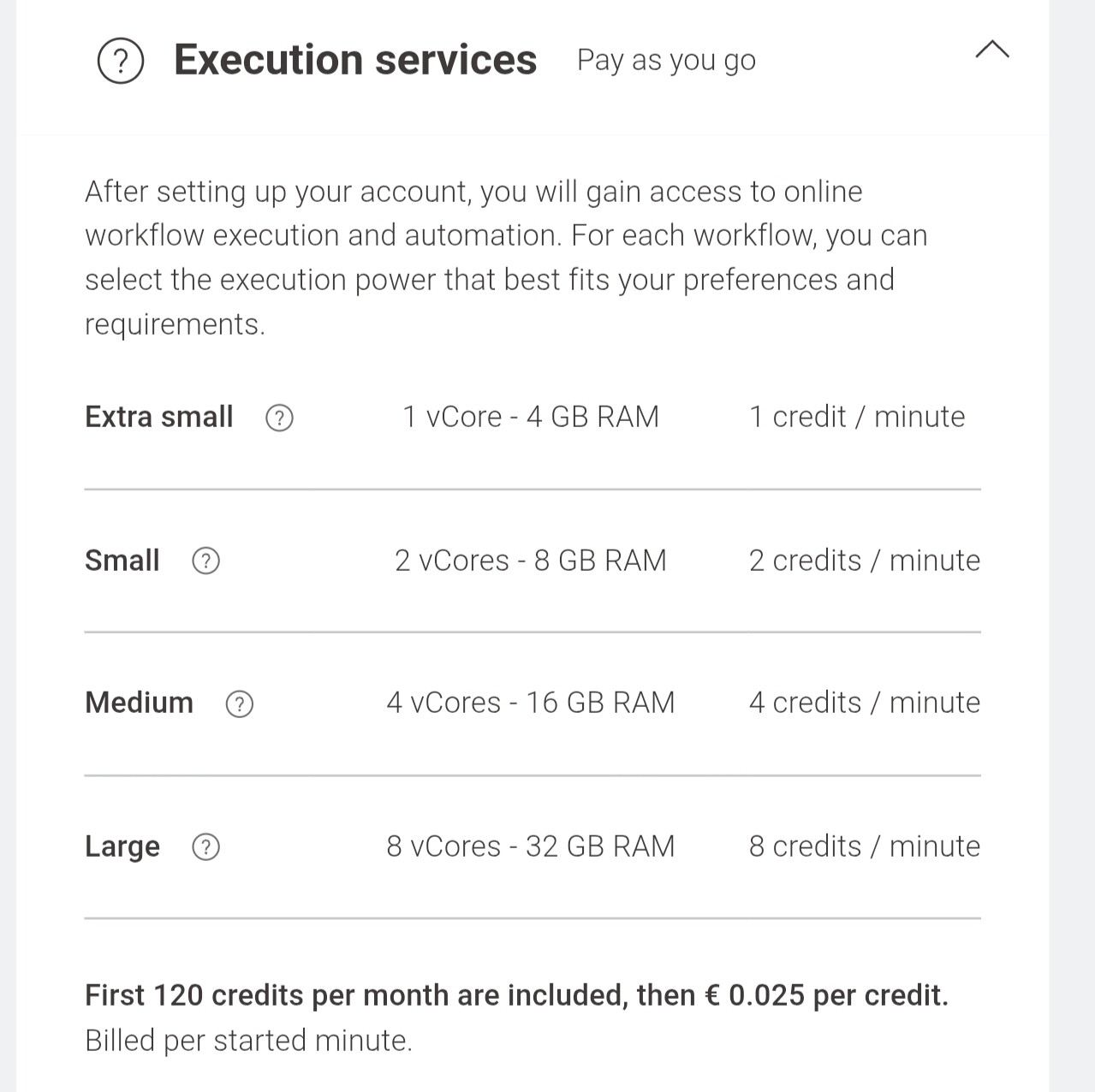
Thank you for the response! That’s great to hear that local workflow building will be available. Does this mean the same for local execution & no usage/workflow/data size limits will ever be imposed on the AP as seen with other low code analytics vendors? (E.g. rapidminer) . Will local batch execution always be available too? Or is this likely to be deprecated at some point & replaced with cloud-native options? knime pro can be a good middle ground for some people but I personally find it very limitng. Additionally, pricing is pretty aggressive for what it offers - especially the runtime & storage part of the pricing on top of the subscription and all for a single seat. You can very easily slap an orchestrator on top of the batch scripts and have a full suite of automation + observability in a nice UI (incl alerts, workflow dependencies , logging etc) with no limits to compute runtime or to the number of seats on cheap hardware (or cloud compute) with relatively little technical knowledge & operational overhead required . For a small number of workflows requiring little compute it’s probably easiest to use knime pro but for anything slightly more advanced, batch execution starts making a lot more sense, especially if you have a variety of scripts to orchestrate together ( e.g. not just KNIME but also other shell& python scripts). The largest execution instance available on pro is 8c & 32gb ram , which isn’t a lot for many workloads and it is priced at 12 USD per hour of runtime, which is more than 40x more expensive vs an equivalent on AWS (t4g.2xlarge) at 0.27 USD/hr on demand. Or a few x more expensive than snowflake’s XS warehouse. Is the ease of use worth the markup vs maintaining batch execution? I am not so sure, at least in my case. Is the revenue potential significant given the markup & the fact that knime is mainly community driven? I think it might be, contrary to what you suggested above. Now, I do think it can be positive for everyone as I want knime to make money and sustain itself, but I also think there might be risks to the community as the VC backers might want to lock this feature out of core AP (especially given the latest funding round) - this pattern is very common in tech lately. In my view, as long as there’s choice of local/self hosted vs cloud/managed, I believe everyone wins
These are all good points and largely fit my use case. I access local files and databases and the vast majority of my runs are sub 5 minutes, but I run a lot of them. I don’t need huge resources to run the flows and don’t require a team to maintain them.
I’ve also been around long enough to remember when Alteryx had a Desktop Scheduler that they discontinued. It used to have a reasonable license fee but when removed the only option was a Server version that was completely out of reach for most use cases. That’s when I moved to KNIME.
While testing out the new batch executor as an extension on 5.9, I noticed that the workflow log output doesn’t appear to have the same log entries. Specifically these lines appear missing:
INFO main BatchExecutor ===== Executing workflow C:\%WORKFLOW_PATH% =====
INFO main BatchExecutor Workflow execution done Finished in 4 secs (4985ms)
INFO main BatchExecutor ============= Workflow executed sucessfully ===============
Am I missing something, or can these be added back to the log output that’s generated by the batch executor?
Currently on Business Hub, but not having to manage the infrastructure is certainly appealing. Does, or will, Knime Pro allow you to use custom profiles and executors. This is critical for using database drivers and plugins that don’t come with a basic instance.
I managed to execute a workflow from Ubuntu terminal command line after installing batch execution extension. I am now going to try to schedule a daily run using Cron. Bit hard as am not at all a UNIX guru…
for debugging purpose, i would recommend systemd instead of cron.
helps with concurrency, adhoc runs and prevents locking etc. (as systemd is usually installed nowadays anyway. just do some google-fu to look into the differences)
I think you should be able to fix it on your end, but I will make sure it is emitting this info again by default in a future release.
As a workaround, you need to go into the workspace you are using for batch execution: <workspace>/.metadata/knime/log4j3.xml. You should find the first block in the file already. Adding the second block to it should fix the problem.
<!-- this block should be in the XML already -->
<logger name="org.knime.core.node.workflow.BatchExecutor">
    <appender-ref ref="batchexec" />
</logger>

<!-- Add this block -->
<logger name="org.knime.ap.batch.BatchExecutorImpl">
    <appender-ref ref="batchexec" />
</logger>
I’ll either place the second block into the file by default or make it so that the log statements appear under the old package name (not sure yet, the former is more accurate, but the latter restores the legacy behavior).
 we find KNIME Pro as an alternative quite compelling (if you can go cloud) and figured that many users who reached out to us because of problems with batch (maintaince, technical knowledge required etc) weren’t really aware of KNIME Pro - so we took the chance to point batch users to KNIME Pro and at the same time try to understand the use-cases for batch better - maybe we can offer something easier to maintain (maybe even supporting local data access) as well - let’s see.