Hi @hops650 … I really hope somebody on the KNIME team has a better answer than mine, because I just tried this out…
I set up two secrets in my KNIME Pro trial space:
TestSecret and SecondSecret
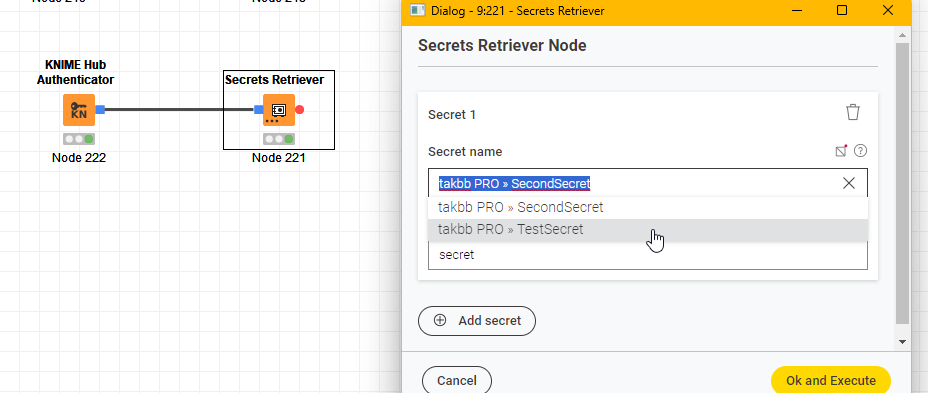
and sure enough, connecting to my hub space, I can choose a secret manually:
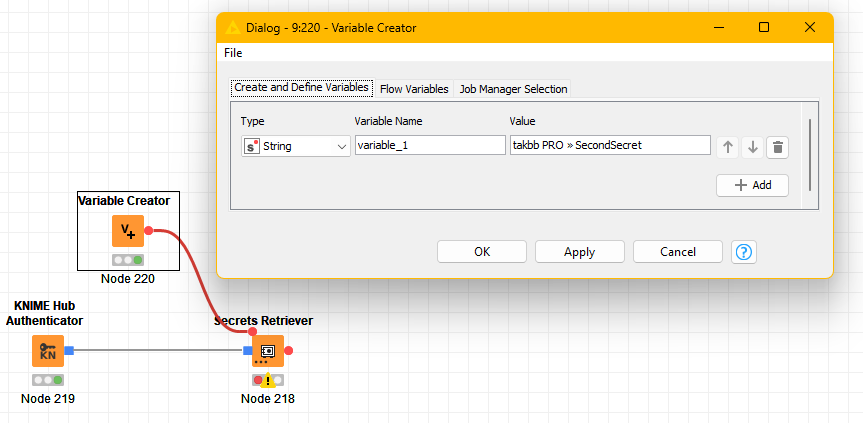
But you are correct that setting a flow variable to either of those names does not work, even if you copy/paste the text as displayed into a flow variable:
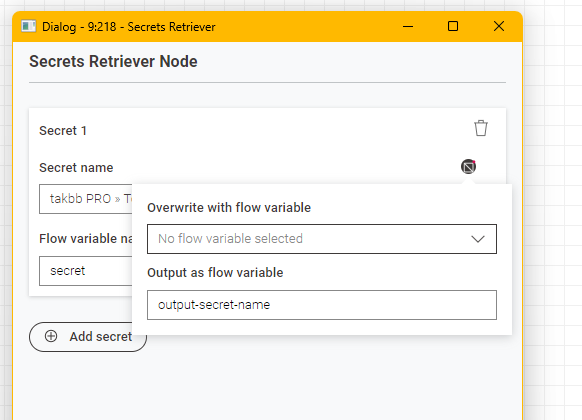
So what do you use? Well we can find out what KNIME expects by setting an output flow variable…
Manually choose a secret and configure the flow variables as follows, so you only set the output:
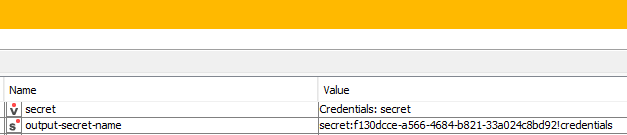
if you then inspect the flow variable that got created (in my case output-secret-name) you will see it says something like this:
So in this case the name of the secret is actually:
| secret:f130dcce-a566-4684-b821-33a024c8bd92!credentials |
|
which if I place in a flow variable, it will supply me with the secret.
So that goes so far with answering your question, and perhaps that is all you need, if for example you are using secrets with KNIME Business Hub?
… but to me, this leaves me with more questions. I had (probably wrongly) expected that I could place a “regularly named” secret on my hub space (say the password to Fort Knox) and I could then email my workflow to somebody else and provided that they had a secret stored on their hub space, with the password to Fort Knox, using the same name as I have on mine, they’d get access.
But this use case would clearly require that the secret on their hub space had the same name as the secret on my hub space… and given the presence of a GUID in the naming convention, this doesn’t seem too likely. 
And I feel sure that the intention is not to just make the above secret on my space available to anybody in the entire world provided they can grab a copy of my “access to Fort Knox” workflow…. and I’d assume that the secret name is actually unavailable to anybody else:
secret:f130dcce-a566-4684-b821-33a024c8bd92!credentials
but feel free to try to access it and let me know.
So, if there is no alternative, I’m guessing some kind of lookup table (created manually) of “logical secret name” to “physical secret key” would be required if this is to be utilised by other users outside of business hub.
… so back to my initial comment, that I hope somebody on the KNIME team has a better answer than me!
footnote - about that » symbol
This from chatGPT:
Ah, you mean the » character — the double (or “guillemot”) chevron pointing right?
On Windows with the Alt codes, you can type it like this (hold Alt while typing the numbers on the numeric keypad):
-
Alt+0187 → » (right-pointing double angle quotation mark)
-
Alt+0171 → « (left-pointing one, if you ever need it)
On Mac:
-
Option + Shift + ] → »
-
Option + ] → «

 Even so someone knows your Secret ID, they can still not access your secret. It still needs to be shared with the user before.