Hi @meTan, the attached flow has two ways that I’ve thought of. The first is more involved than the second, but both result in a list of users who are in the “All Users” list but not in the “Approved” list which is what you said you wanted earlier. I suggest using the nodes I marked as “Option 2” as it is a shorter solution. The Table difference finder node isn’t suitable as it is performing comparisons based on rowid matching too, rather than just looking to see if one set contains the other.
My understanding is that you have two sets of data as pictured in the following:
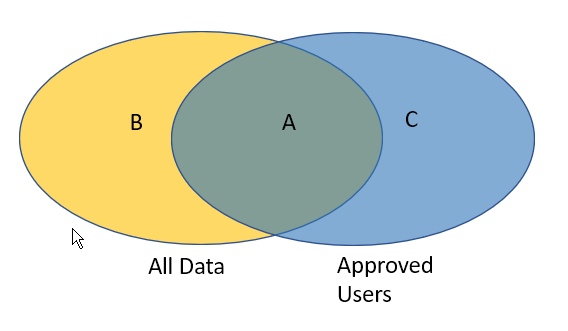
What you are ultimately wanting is the items in “All Data” that are in the yellow region B.
First off, your data sets already contain duplicates so these get de-duplicated before we go any further:
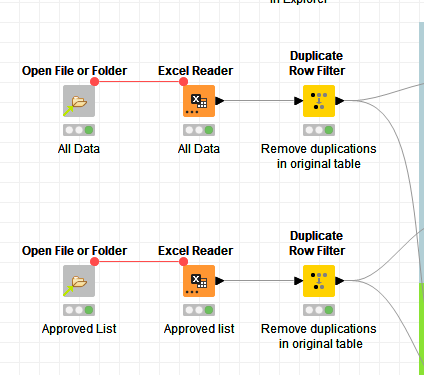
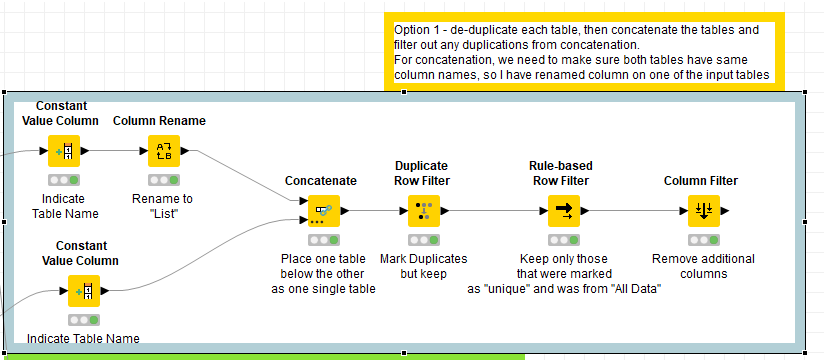
After this you can find a unique set from All Data (regions B+A), and union those (concatenate) with a unique set from Approved Users (C+A). Any duplicates that you now have are by definition in region A (i.e. in both), so these can be discarded. If we make a note of whether each remaining row was originally from All Data or Approved Users, we can select just those that are in All Data and this gives us region B. This is what Option 1 does.
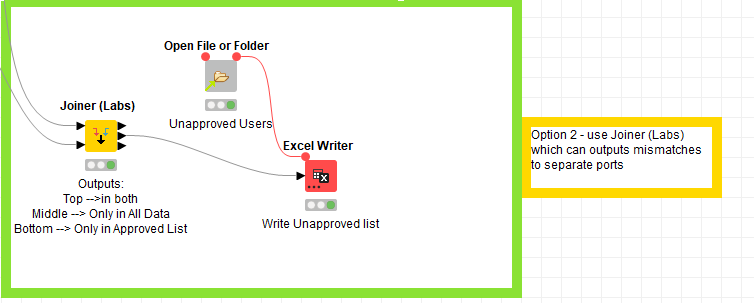
Alternatively, option 2 makes use of a feature of the Joiner (Labs) node. This has the ability to join two data sets All Data and Approved Users and output the items from each of the regions A, B and C into the output ports Top, Middle, Bottom respectively. So this gives you the output that you require on the middle output port. For demo I’ve included in this option the writing to an output excel sheet.
QA-unapproved-users.knwf (198.7 KB)