We are happy to announce that KNIME Analytics Platform 5.8, the latest standard release, is now available to download.
What’s new in this release:
See data output by your agent
The new Agent Chat Widget node (experimental) lets you access agent-generated data directly through an output port. Connect this data to other nodes to build multi-stage data apps or log outputs for governance and traceability, enabling more transparent agentic solutions.
The new node provides the same interactive experience as the Agent Chat View node.
WebGL Rendering Now Default for Improved Workflow Performance
The improved canvas rendering system from version 5.5 is now standard. Workflows load faster and respond better, especially when working with large or enterprise-scale workflows.
Find more details about these updates in our release notes or download the new version of KNIME Analytics Platform below.
After installing KAP 5.8, I am unable to load any of my workflows that contain nodes from the Geospatial extension, and if I attempt to add one of the nodes from that extension to a workflow, the platform locks up entirely and has to be shutdown using task manager.
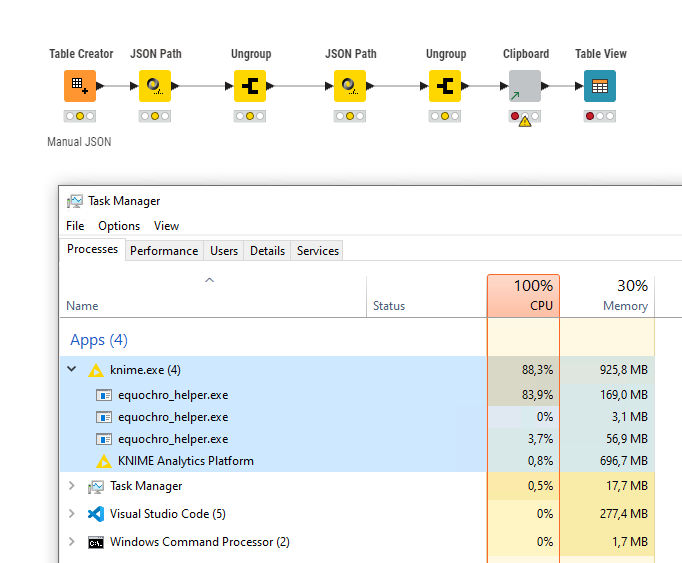
Update - to be more specific, if I start a new workflow it’s initially fine but as soon as I add any node to the canvas I get 100% CPU usage. Seems to be connected to the rendering on the canvas.
Update 2 - Setting this to SVG legacy fixes the issue for me. I was running WebGL under 5.7 with no issues I assume but in 5.8 this has broken something
My device spec is:
Processor AMD EPYC 7763 64-Core Processor 2.44 GHz
Installed RAM 16,0 GB
Device ID XXX
Product ID 00446-90000-00000-AA488
System type 64-bit operating system, x64-based processor
Pen and touch No pen or touch input is available for this display
Edition Windows Server 2022 Datacenter Azure Edition
Version 21H2
Installed on 29-03-2023
OS build 20348.4171
sorry to hear that you are running into this problem. We will be looking into this issue as soon as possible. Just to double check, are you sure that you had WebGL running in 5.7?
Hi @bob_nn07 , WebGL was available for trialling, but not not turned on by default in 5.7. So if you didn’t specifically turn it on in 5.7 you will have been using the older SVG rendering.
The visual difference that you will have seen is if in 5.7 your workflow canvas had scrollbars instead of the “mini-map” in the bottom right of the workflow canvas, you weren’t using WebGL.
I’m no graphics expert, but these lines in the Graphics Feature status you uploaded stood out:
Graphics Feature Status
If WebGL is putting a heavier graphics load on the system, and you have no hardware acceleration available (I’m guessing you don’t have a dedicated graphics card and instead have a lower powered integrated graphics chipset), then “software only” is going to likely hand this all off to the CPU hence the result you are seeing. In which case reverting to SVG Rendering will be the likely solution, at least in the short term.
If you are using “Windows Server 2022 Datacenter Azure Edition”, you are presumably running this in a VM ?
I didn’t have the mini-map in 5.7 so I must have been using SVG
I upgraded yesterday, saw the mini-map and the CPU issue started
I didn’t activate WebGL myself after upgrading, I only thought to look there after my issues started. So maybe the issue is that I got switched to WebGL on the upgrade?
Yes I believe so. I haven’t performed an upgrade on my 5.7 installation, but I have installed 5.8 separately and one of the changes is that WebGL is now switched on by default, so I think it likely that the intention was to move existing installations to this. In your case I’d definitely switch it back at least for the moment.
To be honest this has made me a little nervous about following the 6 week update path, especially when changing the default settings can have serious consequences. It’s the first time I’ve had issue like this after upgrading.
I agree it’s a difficult decision. The KNIME team do extensive regression testing with each release but there is always the possibility of something slipping through the net.
My own approach is that I allow a KNIME version to update “dot releases” within that version, so for example if I had KNIME 5.5 installed, I would allow it to update to 5.5.1, but for the major releases 5.6, 5.7, 5.8 I install these separately into their own folders from ZIP files, re-install the extensions in each. That why I can revert back if I need to (provided of course that I have kept back-ups of any workflows or not opened/saved them using the new version or if it only uses nodes that have not been replaced in the new version, as for complex workflows downgrading a version can be non-trivial).
In this specific case, I’m assuming that running KNIME in a VM with no graphics acceleration was an edge case that got missed, and unless somebody else has hit the problem, it won’t matter how many versions you wait before taking the plunge, as you could still end up being the first person to discover it.
From what I’ve just been reading up on the web, WebGL is heavily reliant on hardware acceleration and isn’t going to perform well in an Azure VM, so doubtless this is something that will have to be considered going forward.
Hopefully though with the rendering setting reverted, you should be good to go with 5.8.
(On a playful note, with software updates generally, I am reminded of an old poster I once saw that said “sometimes your only purpose in life is to serve as a warning to others” )
Any ideas on how to solve this or what additional data I can provide to help ID the problem? I don’t want to go through the hassle of uninstalling 5.8 and manually installing 5.7 if I don’t have to
Just make sure WebGL is not enabled in your preferences and you should be fine (choose SVG). You probably won’t even hit the issue since it seems to be an untested edge case.
As for installing 5.7 that’s not as easy as you think. It was my first idea but it’s not available to download, only 5.8 and 5.5 and previous. Once you’re on the latest upgrade train it’s not possible to roll back.
Hi @RedJungleBear I installed a fresh 5.8 KAP, installed the geospatial extension and managed to use the nodes without any problems. Could you provide the knime.log so we can try to find the reason? Can you open a fresh notebook and use the goespatial nodes in there?
as @takbb pointed out already this is due to the technical switch towards a WebGL based approach. Though, I would love to understand your use case as this seems to be sort of a special setup that you are using.
KAP works fine for me using SVG, as long as the option isn’t removed in future releases I’m OK.
As for a a ‘special setup’ I don’t think my setup is very special. I just run KAP on an Azure Server that I access via Remote Desktop. It’s a completely standard server but obviously doesn’t have dedicated graphics. I would imagine many users have similar setups.
Use of Analytic environments on Virtual Machines is quite standard (IT can assign resources to analysts while controlling access/enabling linux environment in Windows oriented organisation et cetera)





 )
)