Hi,
I have a problem when attempting to run a Python Script node (that was working well one year ago with another version of KNIME, but I don’t remember which one).
The concrete error is this:
Node can’t be executed - Node “Python Script” not available from extension “KNIME Python Integration” (provided by “KNIME AG, Zurich, Switzerland”; plugin “org.knime.python3.scripting.nodes” is not installed)
It appears at the node itself in the GUI, as a Node warning, but it prevents the workflow to be executed:
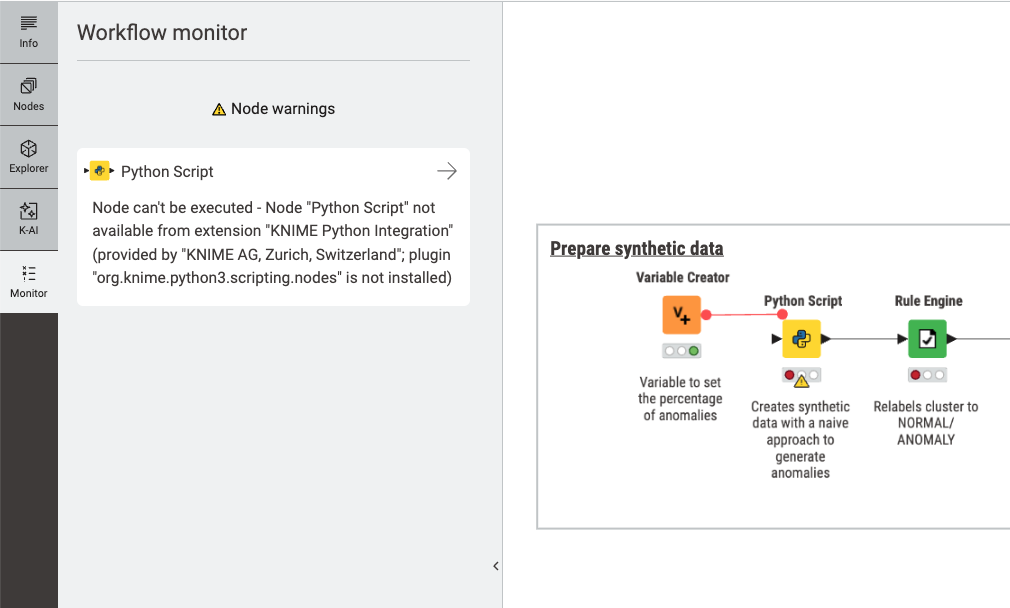
I have checked:
- That the Python Integration extension is correctly installed.
- That the configuration is ok (I have tried with the Bundled option and with the conda based option and fails equally with both).
I have found some similar problem time ago that was fixed:
There is a log entry that may be related to it and mentions some problem with an iframe (I guess this is related to some bundled browser inside KNIME):
2026-02-10 14:06:31,951 : WARN : main : : KnimeBrowserView : : : An iframe which has both allow-scripts and allow-same-origin for its sandbox attribute can escape its sandboxing. (source: https://org.knime.core.ui.dialog/uiext-dialog/org.knime.python3.scripting.nodes2.script.PythonScriptNodeFactory/index.html; line: 0)
…
Any help would be greatly appreciated.
Best regards,
Miguel-Angel