Ol_s
November 18, 2019, 8:19am
1
Hi there! I have KNIME ver 4.0.0, but when I looking for R-scripting option in Preferences I see nothing (File->Preferences->KNIME). Can anybody help me?
ipazin
November 18, 2019, 4:46pm
2
HI there @Ol_s ,
welcome to KNIME Community!
So you do not see this options when you chose R?
Or you are looking for something else?
Br,
Ol_s
November 18, 2019, 8:08pm
3
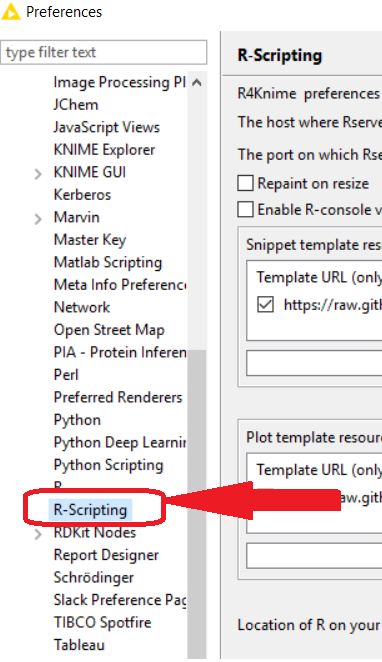
Ivan, thnks for answering. I mean that usually I see “R-scripting” option below “R” option (see the attached file).
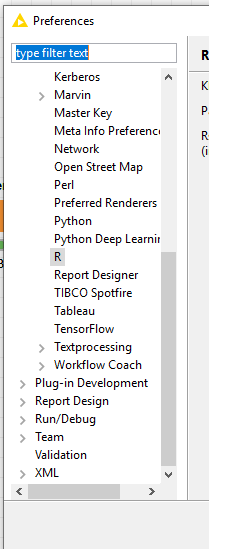
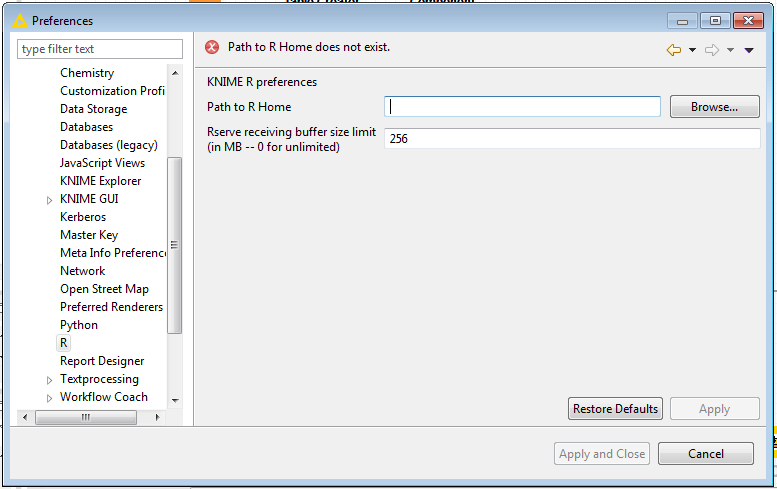
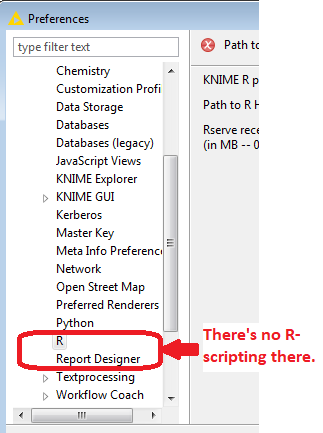
But when I’ve downloaded KNIME 4.0.0 I saw nothing (see the picture below):
The use of R and KNIME can be a little bit challenging but you might want to refer to these two entries explaining the steps
Install R alongside KNIME on Windows and MacOS
Over the last months I have collected a few entries about the installation of R alongside KNIME that contain some maybe useful hints how to overcome certain obstacles while installing them. I want to bring them together here. (If you are looking for a basic guide about how to install R in the first place you might look here or here ).
A few maybe unnecessary remarks upfront. Yes it takes some effort to get KNIME and R up and running but in the end you will be rewarded with the whole world of pos…
Not exactly sure what you mean by installed by both R and RStudio. Typically you should only have one R installation with one library. You could try and check your version’s library with this comand:
.libPaths()
The error messages hint that you do not have the relevant package docxtractr installed.
And you will have to install RServe in the latest version. One thing I had success wit recently is described here:
https://forum.knime.com/t/integrating-r-with-knime/17291/6?u=mlauber71
After you…
ipazin
November 19, 2019, 12:16pm
5
Hi there @Ol_s ,
did you install R Scripting extension with your new version?
Br,
Ol_s
November 19, 2019, 2:28pm
6
No, I didn’t. I’m a newbie in Knime settings. Thank you so much for the help.